Urgency.
Bring cameras needing attention visually closer.
What if the health of a camera system was something you could see in space, instead of searching through another screen?
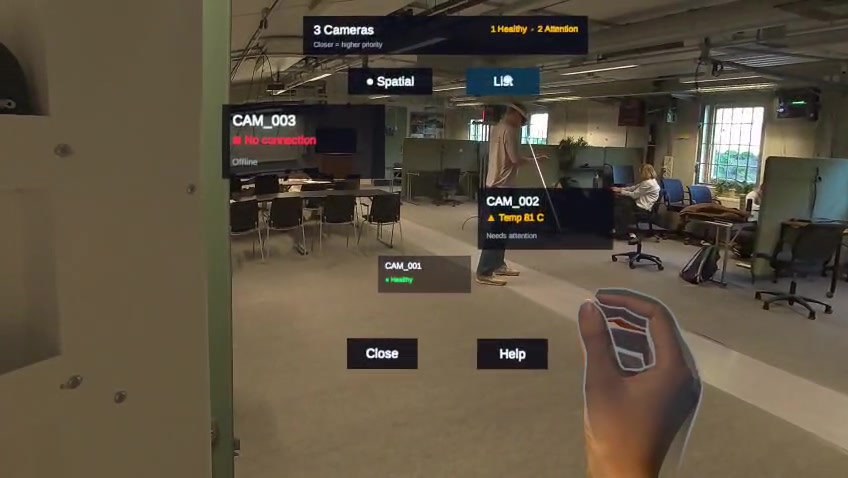
The overview is the starting point: disconnected and warning cameras appear closer, while healthy devices recede. Spatial depth expresses attention priority; it does not represent the camera’s physical distance.
20-second excerpt from the original Quest recording. Original capture resolution limits fine-text detail. Status values are development examples.
My contribution: Unity interface prototyping, hover and selection, diagnostic presentation and camera-data integration. This is a team course project with Axis Communications, rather than a shipped Axis product.
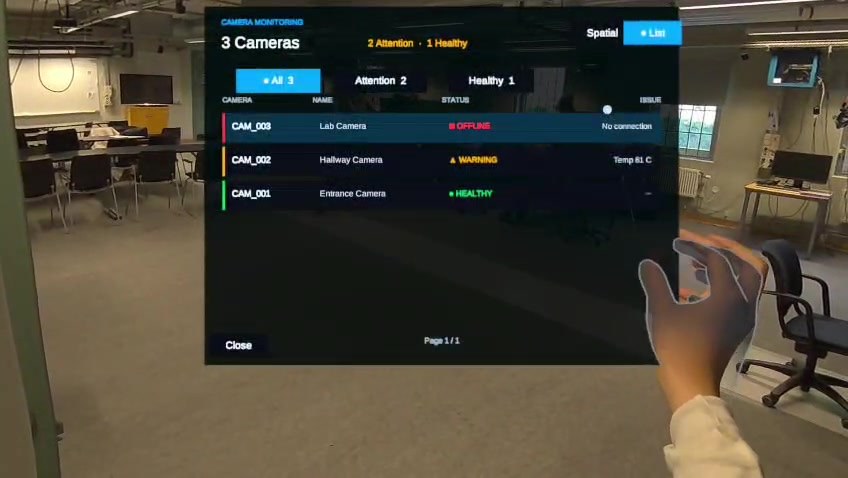
In the headset recording, the same three cameras can be viewed as a conventional list or distributed across the physical environment. One is marked healthy, one warns about temperature, and one has no connection.
The design hypothesis is simple: spatial proximity, depth and visual emphasis may help people notice problematic devices sooner and identify where to inspect them. The interface is a research prototype—not a claim of validated performance.
Bring cameras needing attention visually closer.
Use layers to organize a monitoring scene without crowding it.
Distinguish priority layout from registered physical camera locations.
The uploaded Quest 3 footage shows the Spatial and List modes, an onboarding flow with point-and-pinch input, QR-based camera identification, and a detail view for a camera marked as requiring attention.
Differentiate healthy, warning and disconnected cameras before opening the diagnostics.
Select a device and retrieve concise issue information without reading a full server report.
Relate the device identifier to a physical camera. The animated route above is conceptual, not a validated collision-aware route.
The web reconstruction explains the interaction, while the original recording above documents the headset prototype. The overview statuses are development examples and are not live VAPIX readings. Separate camera integration work connects real device telemetry through a Python proxy.
This public case study demonstrates the visualization and interaction concept. It does not establish task-time improvements, camera availability in production, validated indoor navigation, or experimental significance.
Source: Axis XR Monitoring project (ongoing course work). The complete Unity implementation, prototype evolution and research evaluation are maintained separately from this simplified web experience.